See whether your book is growing
Commission tells you what a month paid. October adds the book behind it: how many merchants you keep, how many you lose, what that does to your monthly revenue, and which accounts are worth a call before the money goes. Your agents get the same view of their own book.
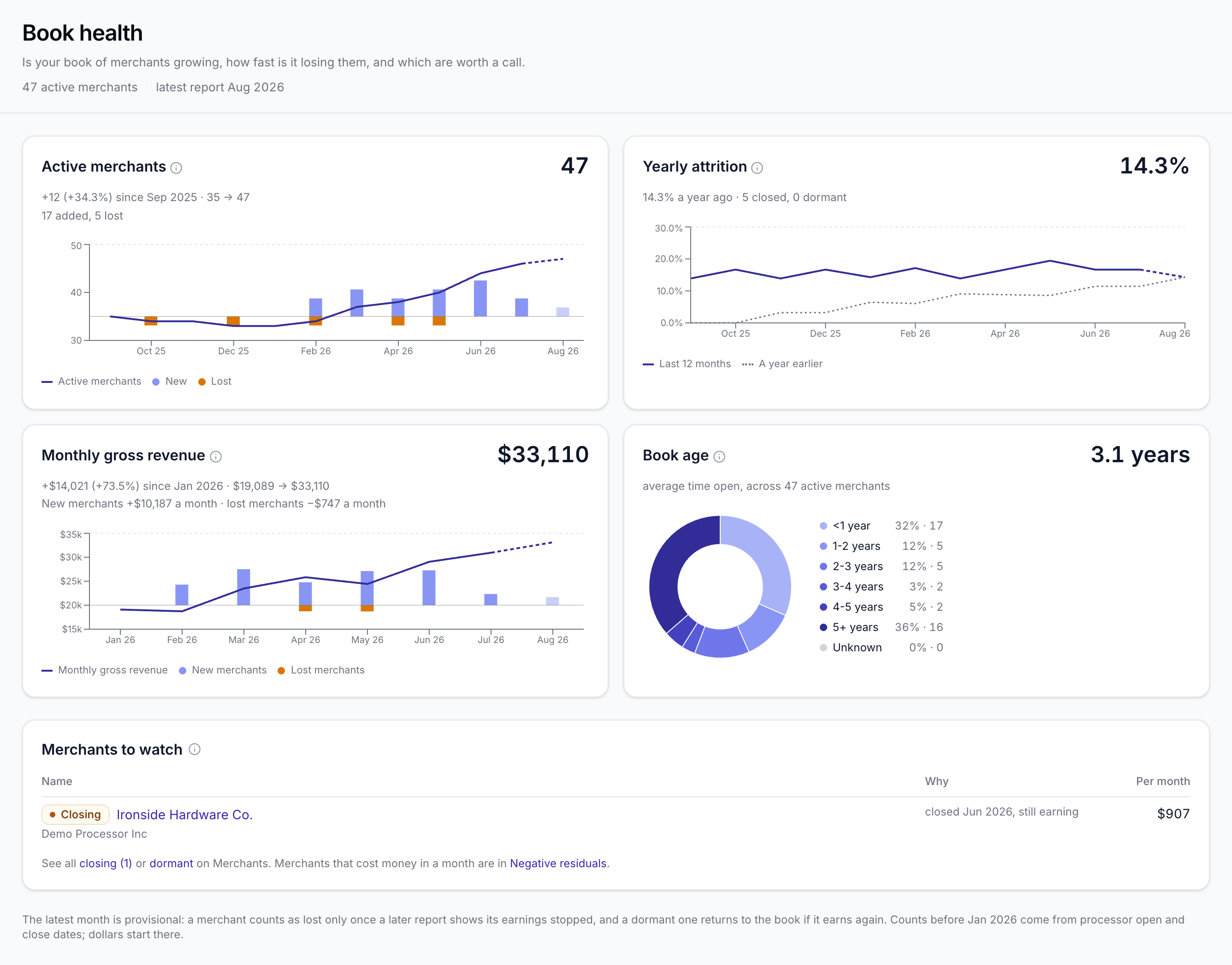
Book health: is your book growing, and how fast is it losing merchants
Residual income is built one merchant at a time and lost the same way, a few each month. Totals that rise or hold steady can hide a book that is quietly shrinking, and by the time it shows in the revenue line the merchants are long gone.
Book health puts the answer on one page. See how many merchants are in your book each month with the new and lost beside them, your yearly attrition next to the year before, the monthly gross revenue new merchants brought in against what lost ones took with them, and how long your merchants have been open on average. A merchant counts as lost when the processor closes it or it goes three months without earnings. When your processor reports list open and close dates, SplitRun reads them as you map the report and keeps them current with every upload.
Below the charts sits your call list: accounts the processor has closed that are still earning, and the ones that have gone quiet in the last year, ranked by what each is worth a month. The Merchants list has a filter for each, so you can work through them from the page you already use.
Accounts to watch: who to call this month
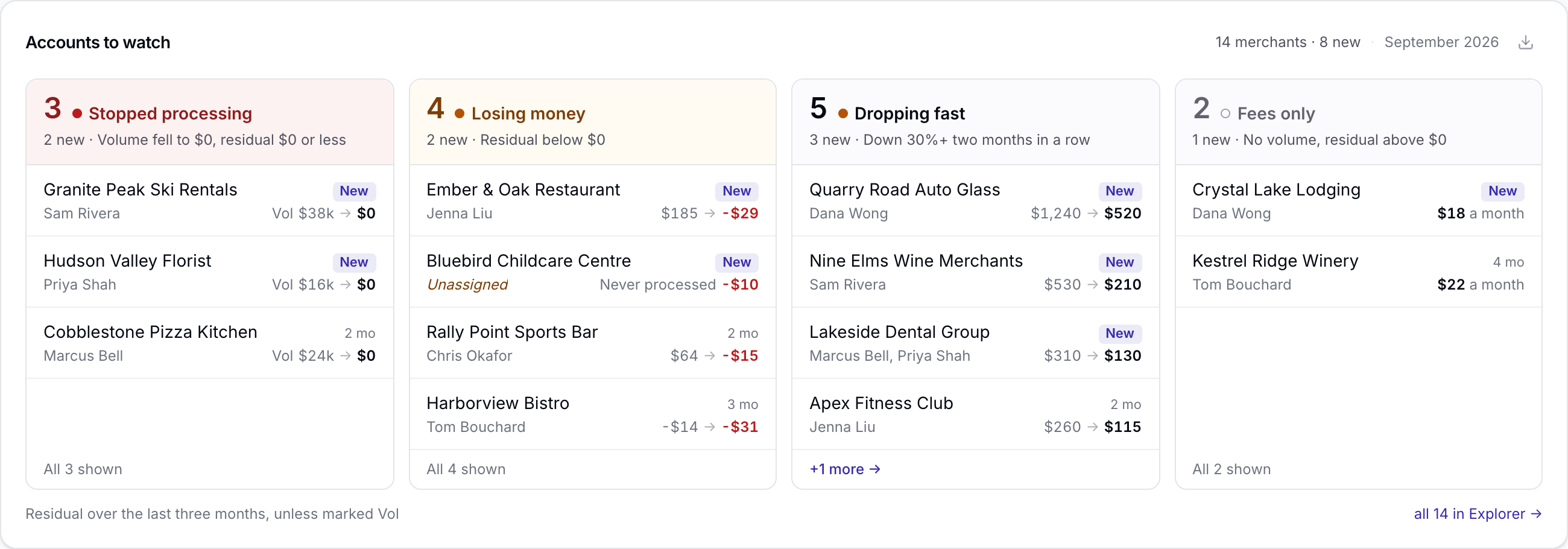
Every month a few accounts slip. One stops processing, one starts costing you money, one halves in two months. By the time it shows in your totals the merchant is gone, and building the list for your reps by hand takes an afternoon.
Accounts to watch sits on your Dashboard and sorts those accounts into four groups: Stopped processing, Losing money, Dropping fast and Fees only. Each account shows its agent, how long it has been on the list and what moved, newest first. A new account charged fees before its first sale shows under Losing money, marked Never processed. Click a group for the full list in Explorer, where you can filter by reason or agent and download it for your reps.
Your agents get the same list for their own merchants, without waiting for you to send it. A card on their portal home page and the full list on My Accounts show which of their merchants stopped earning, cost them money, are closing or are dropping fast, all in their own commission and nothing from anyone else's book.
Every agent can follow their own book
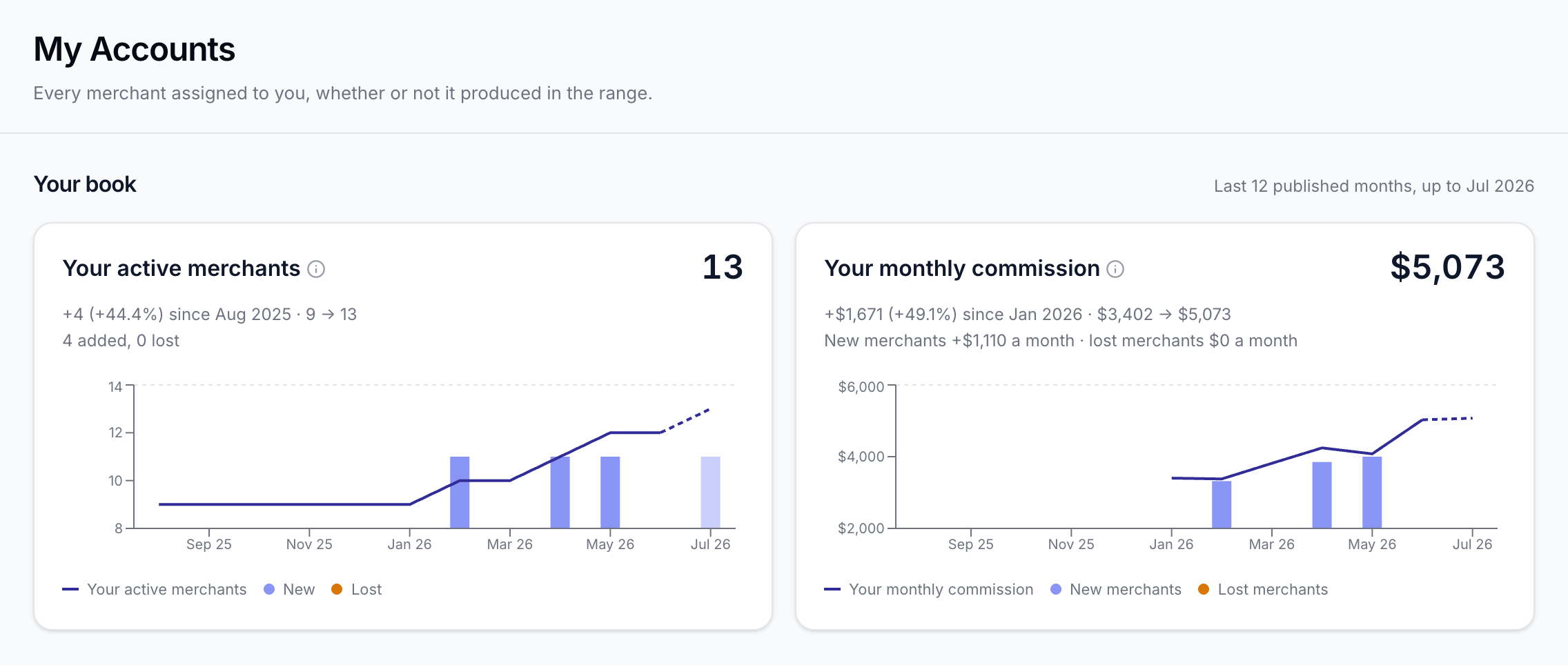
An agent who can see their book shrinking is an agent who goes and does something about it.
My Accounts in the agent portal now opens with Your book: how many of their merchants are earning them commission, how many they added and lost over the last 12 published months, and what that did to their monthly commission. Agents see their own commission only, from published months, and nothing about anyone else's book.
Also in this release
- NewRepeat an adjustment for as many months as you need. A monthly software fee or an equipment charge goes in once, for a set number of months or until you stop it. Each month's line names the merchant it is for on the statement, and the agent's page lists every repeating adjustment with Edit and Stop.
- ImprovedAdjustments, account by account. Link an adjustment to the merchant it is for and it counts toward that merchant's Contribution on its page and in Explorer, so every account shows what it truly brings in.
- NewSee every merchant losing you money. Explorer's Merchants tab has a Negative residuals view: every merchant that went below zero in the last 3, 6 or 12 months, one column per month, ready to export. Agents see their own negative months on My Accounts.
- NewYour book, one data source at a time. Pick one data source, a few or all of them in Explorer and on Book health, and every card, chart and export follows. Split the Explorer chart by data source to compare processors side by side. Agents get the same choice on My Accounts.
- NewSee who your book depends on. On the Dashboard, What the book depends on shows how much of what you keep rests on your top 10 merchants and top 3 agents. Click either to see who they are and each one's share.
- ImprovedTake any number with you. Every Export button offers Excel or CSV, with clean headers, money to the cent and real percentages. Each Dashboard card downloads the full data behind it, and any chart saves as an image signed with your company name, ready for a deck or an email.
- ImprovedUpdate a sent statement, only where it changed. Recalculate a published month and Reports shows which statements moved. Republish sends the new version only to those agents, and their email shows the earlier figure beside the change.
- ImprovedChange an agreement before it starts. An agent's upcoming agreements have the same edit and delete buttons as the current one, so a rate set for next month can be adjusted or removed in place. A new rate always starts after the agreement it replaces.
Want to see these in your account?
Open SplitRun